Master Planning Workflow for Urban Planners: 2026 Guide
Master Planning Workflow for Urban Planners: 2026 Guide
TL;DR:
- A master planning workflow is a structured process that guides site evaluation, risk assessment, and stakeholder communication in a repeatable cycle. It relies on five core components and disciplined documentation, with sequencing and task ownership preventing delays and failures. Implementing continuous revision and AI tools improves efficiency and reduces costs in federal and commercial planning projects.
A master planning workflow is the systematic process urban planners and project managers use to sequence site evaluation, risk identification, and stakeholder communication into a single, repeatable cycle. Without a defined sequence, projects stall at the revision stage or miss code compliance windows entirely. Organizations with a formal strategic planning process are 2.5 times more likely to succeed than those using ad-hoc approaches. That gap is not a soft metric. It reflects the difference between a project that reaches groundbreaking and one that cycles through endless approvals.
What are the essential components of a master planning workflow?
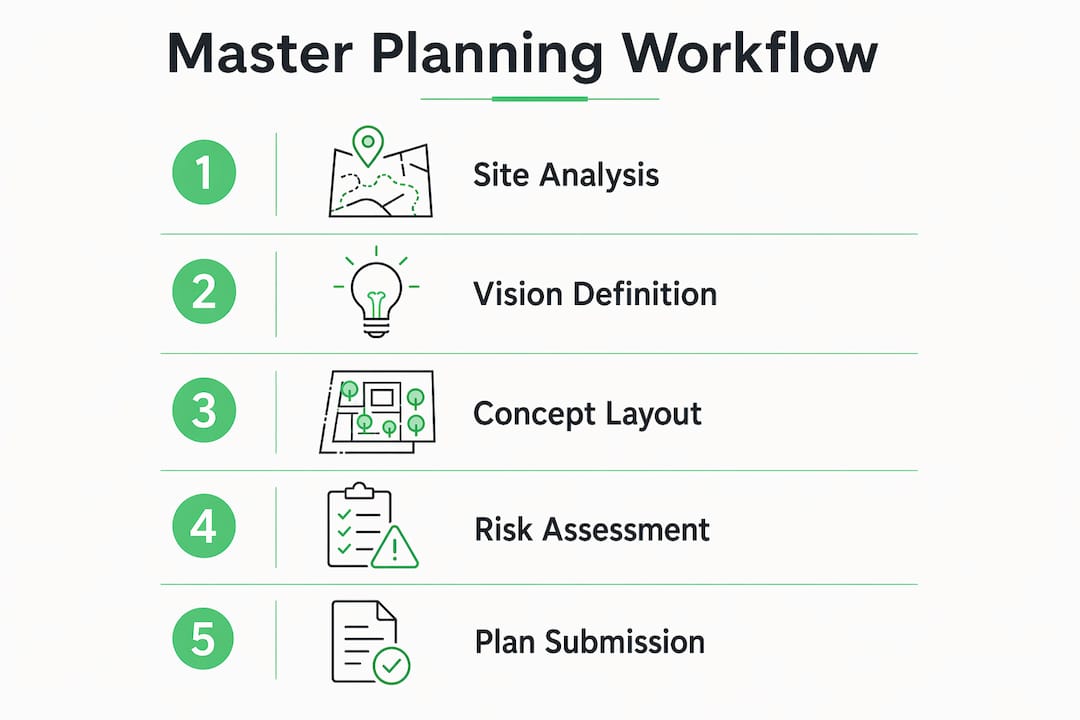
A master planning workflow rests on five core components: site analysis, vision definition, conceptual layout, risk assessment, and iterative refinement. Each stage feeds the next. Skipping site analysis, for example, produces concept drawings that conflict with zoning overlays or environmental constraints discovered later at significant cost.

Structured documentation is the connective tissue between these stages. Urban planners rely on a Common Data Environment (CDE) with clear file lifecycle controls to prevent delays caused by incompatible model versions. A CDE manages file transitions from Work in Progress through Shared and Published states, so every team member works from the same approved baseline. Without that control, revision conflicts multiply and project timelines compress dangerously.
| Workflow component |
Typical tools and standards |
| Site analysis |
GIS mapping, environmental impact databases |
| Vision definition |
Stakeholder workshops, program briefs |
| Conceptual layout |
CAD drafting, 3D massing models |
| Risk assessment |
Bottleneck mapping, scenario planning matrices |
| Iterative refinement |
CDE version control, approval tracking logs |
Pro Tip: Build your CDE file naming convention before the first drawing is created. Retrofitting naming standards mid-project costs more time than establishing them upfront.
Preventing project delays starts with documentation discipline. Teams that define file ownership, approval authority, and version numbering at kickoff spend far less time resolving conflicts during design development.
How do you sequence and execute master planning workflow steps?
Execution sequence determines whether a planning cycle runs in 4 weeks or 12. A professional master plan typically requires 4 to 12 weeks to develop, depending on scale and complexity. That range exists because sequencing decisions made in week one either compress or expand every subsequent stage.
The standard execution sequence follows this order:
- Site assessment (weeks 1–2): Survey physical conditions, zoning constraints, and utility infrastructure. Assign a lead planner and a data custodian.
- Vision and program setting (week 2): Facilitate stakeholder workshops to define goals, density targets, and phasing priorities.
- Conceptual drafts (weeks 3–5): Produce massing studies and circulation diagrams. Submit for internal review before external distribution.
- Regulatory pre-check (week 5–6): Verify draft compliance with local codes, federal accessibility standards, and environmental review thresholds.
- Approval and revision cycle (weeks 6–10): Incorporate agency and stakeholder feedback. Track each revision against the original program brief.
- Final plan submission (weeks 10–12): Publish the approved master plan to the CDE in its final state. Archive all working files.
Successful planners standardize 80% of routine tasks and reserve flexibility for the 20% of exceptions that require judgment. That ratio keeps teams moving without creating rigid processes that break under real-world conditions.
Pro Tip: Assign revision ownership at the start of each approval cycle. When no one owns a comment, it sits unanswered for days. Named ownership closes feedback loops in hours.
Construction workflow management research confirms that undefined task ownership is among the top causes of schedule slippage on multi-stakeholder planning projects. Naming a decision owner for each workflow gate removes the ambiguity that stalls progress.
What are the common risks in master planning and how do you identify them early?
The most common source of delay in a planning cycle is not technical complexity. It is documentation error compounded by uncoordinated revisions. A drawing issued from a superseded file, a zoning reference pulled from an outdated municipal code, or a comment logged in an email thread rather than the CDE. Each of these is a process failure, not a design failure.
Automated process mining can uncover shadow processes in any workflow. Shadow processes are unofficial workarounds teams develop when the formal process is too slow or unclear. They are invisible to project managers until they cause a conflict. Identifying them requires mapping what teams actually do, not what the workflow diagram says they should do.
Key risk factors and their corresponding safeguards:
- Incompatible model versions: Enforce CDE lifecycle controls with locked Published states.
- Undefined approval authority: Document a RACI matrix at project kickoff and review it at each phase gate.
- Scope creep from late stakeholder input: Set a formal comment period with a hard close date for each draft cycle.
- Regulatory misalignment: Schedule a pre-submission meeting with the authority having jurisdiction before the final draft is complete.
- Communication gaps between disciplines: Use a single shared log for all cross-discipline comments rather than parallel email threads.
Pro Tip: Run a bottleneck mapping session after the first draft cycle on every new project. Ask each team member where they waited longest. The answers reveal the real workflow, not the planned one.
Digital workflows in construction reduce risk by creating an auditable record of every decision. When a regulatory agency questions a design choice made six months earlier, that record is the difference between a one-day response and a two-week search through email archives.
How does collaborative technology improve master planning workflow efficiency?
Effective strategic planning is a continuous cycle requiring ongoing review and revision, not a one-time annual event. That principle applies directly to master planning. A plan approved in january of a given year may face changed market conditions, revised federal accessibility standards, or new environmental data by july. Teams that treat the approved plan as a closed document lose the ability to respond.
Modish addresses this with Architectural Diagnostic Intelligence™, which identifies structural, environmental, and code compliance failure points before construction commits. The Cinematic Intelligence™ engine renders corrective solutions in federal submission-grade visualization, giving planners a live view of compliance exposure at each design iteration. Multiplicity Modeling™ generates 192 corrective visualization options per Space, so teams evaluate alternatives without commissioning separate studies for each scenario.
| Feature category |
Traditional method |
AI-enhanced approach |
| Compliance review |
Manual code check per discipline |
Automated cross-discipline scan at each iteration |
| Stakeholder visualization |
2D drawings and static renderings |
Federal submission-grade 3D visualization |
| Risk identification |
End-of-phase review |
Continuous, embedded at each workflow stage |
| Revision options |
One or two alternatives per review |
192 corrective options per Space |
The intelligence in master planning is not about replacing planner judgment. It is about removing the lag between a compliance question and a credible answer. When that lag disappears, approval cycles shorten and stakeholder confidence rises.
Pro Tip: Integrate automated compliance alerts at the draft stage, not the submission stage. Finding a code conflict at submission costs ten times more to resolve than catching it during conceptual design.
Key takeaways
A master planning workflow succeeds when it combines structured sequencing, CDE-based documentation, proactive risk identification, and continuous revision cycles supported by AI-enhanced diagnostic intelligence.
| Point |
Details |
| Structured sequencing matters |
Follow a defined 4–12 week stage sequence to prevent scope drift and approval delays. |
| CDE discipline prevents conflicts |
Enforce file lifecycle controls from day one to keep all teams on the same approved baseline. |
| Shadow processes hide real risk |
Map actual team behavior, not workflow diagrams, to find unofficial workarounds before they cause failures. |
| Standardize the routine |
Apply the 80/20 rule: lock down repeatable tasks and reserve flexibility for genuine exceptions. |
| Continuous revision is the standard |
Treat the master plan as a living document requiring scheduled review, not a closed deliverable. |
The workflow mistake I see on almost every federal project
After working across federal A&E pursuits and commercial master planning engagements, the pattern I see most often is not a technology gap. It is sequencing discipline applied inconsistently. Teams invest in sophisticated tools and then use them on broken processes. Salesforce AI process experts put it plainly: automating broken processes speeds up failure. The tool is not the problem. The sequence is.
The second pattern is treating the approved master plan as a finished product. Harvard Business School’s insight on strategic planning applies here directly. A plan that does not have a scheduled review date is already becoming obsolete. The architecture master planning tips that hold up across project types are the ones that build revision into the workflow from the start, not as an afterthought when something goes wrong.
What Modish’s Cinematic Intelligence™ infrastructure does differently is embed compliance review inside the workflow rather than appending it at the end. That single structural change removes the most expensive category of delay on federal projects. The 26% of workday time wasted on administrative inefficiencies does not disappear by adding more tools. It disappears when the workflow sequence is clean before any tool touches it.
— Ben
Modish.ai and the future of architectural planning intelligence
Urban planners and project managers working on federal and commercial master plans need more than a workflow checklist. They need diagnostic intelligence embedded at every stage of the planning cycle.
Modish’s Architectural Diagnostic Intelligence™ engine identifies code compliance failure points, renders corrective solutions in federal submission-grade visualization, and delivers 192 corrective options per Space. The DesignVault 3D™ infrastructure and Multiplicity Modeling™ give planning teams the depth of analysis that single-pass reviews cannot match. Modish is SAM.gov registered and DOBE-certified, making every engagement count as Tier 1 diverse spend. Explore the full capability at modish.ai and see how Architectural Diagnostic Intelligence™ changes what a planning workflow can deliver.
FAQ
What is a master planning workflow?
A master planning workflow is a structured sequence of stages, from site analysis through final plan submission, that guides urban planners and project managers through evaluation, risk identification, and stakeholder approval. It replaces ad-hoc decision-making with a repeatable, auditable process.
How long does a master planning workflow take?
A professional master plan typically requires 4 to 12 weeks to develop, depending on project scale and complexity. Larger federal or multi-site projects trend toward the longer end of that range.
What is a Common Data Environment in master planning?
A Common Data Environment (CDE) is a shared digital space where all project files are managed through defined lifecycle states, from Work in Progress to Published. It prevents delays caused by teams working from incompatible or superseded model versions.
How do you identify risks early in a planning workflow?
Early risk identification uses bottleneck mapping, shadow process discovery, and scenario planning to find failure points before they reach the approval stage. Embedding compliance review at the draft stage rather than the submission stage is the most effective single change a team can make.
What is the 80/20 rule in workflow optimization?
The 80/20 rule means standardizing 80% of routine workflow tasks while preserving flexibility for the 20% of exceptions that require judgment. This balance maintains efficiency without creating rigid processes that break under real project conditions.
Recommended